
What is landplan.io?
landplan.io is septic design and land planning software that runs in your browser. Give it an address and it finds the parcel, reads the site, designs a system that fits your county's rules, and makes the report PDF. It takes minutes, not days.
What landplan.io does
A septic design in landplan.io follows the same path every time:
- Address. Type a street address, a parcel number or coordinates in the search on the map.
- Parcel. The parcel lines come onto the map, and the project is created on them.
- Site data. landplan.io reads the elevation, the soil, the water and the setbacks for that parcel.
- System. You design the house, the tanks, the absorption area and the pipes, or let landplan.io design them.
- Report PDF. The plan sheets and the calculations for the permit, and a cost estimate PDF.
It is made for the people who design, build and check septic systems:
- Designers and engineers who draw and size systems.
- Installers who price and build them.
- Soil evaluators who log test holes and soil tests.
- Inspectors and health departments who review the plans.
- Organizations that do all of this as a team.
Two ways to design
Click Design in the bar at the top of the map and choose how to work:
- Smart design (recommended) takes you through eight steps: site, soil, system, house, spot, tanks, pipes and review. It ranks the systems that fit the parcel. At each step you place the part yourself, or press Place it for me.
- Auto design does the whole job in one press. From an address and the number of bedrooms, it creates the project, picks the system, places the house, tanks and pipes, checks the setbacks and makes the report PDF. It takes about a minute, and it tells you why it made each decision.
Both draw ordinary map features, so you can move or change any part by hand afterwards. See Smart Design and Auto Design.
Site data, read for you
landplan.io loads the data a site plan needs, so you don't have to collect it first:
- Parcels. Parcel lines from statewide parcel databases, found by address or parcel number.
- Elevation. Contours down to 1 ft, a shaded DEM and a hillshade, made from public lidar (USGS 3DEP in the US, NRCan in Canada). Open the Elevation group under Layers and click Load elevation for this site.
- Soil. The NRCS soil survey, with its red flags such as slow permeability or a high water table. Your own soil tests and test pits come first: enter them with the Soil tools, or log test holes from the surface down in the Field Log (beta).
- Water. Wetlands, streams, water bodies and wells on and near the site.
- Flood zones. Whether the site is in a FEMA flood hazard area. Click the flood chip, or Show on map by the flood check, to see the zones on the parcel: red where your state's rule keeps the system out of them, amber where it can go there with a design for the floodplain. Where no flood data is loaded, Smart design says the zones were not checked; it says No flood map only where FEMA has no digital flood map for the parcel.
- Land cover. Paved areas and tree canopy seen in the aerial imagery, so the design keeps clear of them.
- Setbacks. The distances from your county's rules: wells, property lines, buildings, water and more.
Smart design shows what it found over the map, for example 10 ac, 8.7% slope, No flood zone.
Draw and edit on the map
The map is drawn to scale, in true units, with snapping. Click Tools in the top bar to open the Tools drawer. Its groups are:
| Group | What's in it |
|---|---|
| Edit tools | Select, move, copy, rotate, scale and delete what you drew. |
| Measure | Length, area and slope. |
| Basic tools | Your own features, parcels, buffers, georeferenced images, uploaded data, and GPS import and export. |
| Soil | Soil boundaries, soil tests, test pits and soil and hydro data. |
| Septic design | Elevation, cut and fill, setbacks, buildings, tanks, the treatment train, trenches, contour systems, spray zones, the distribution method, pipes and fittings. |
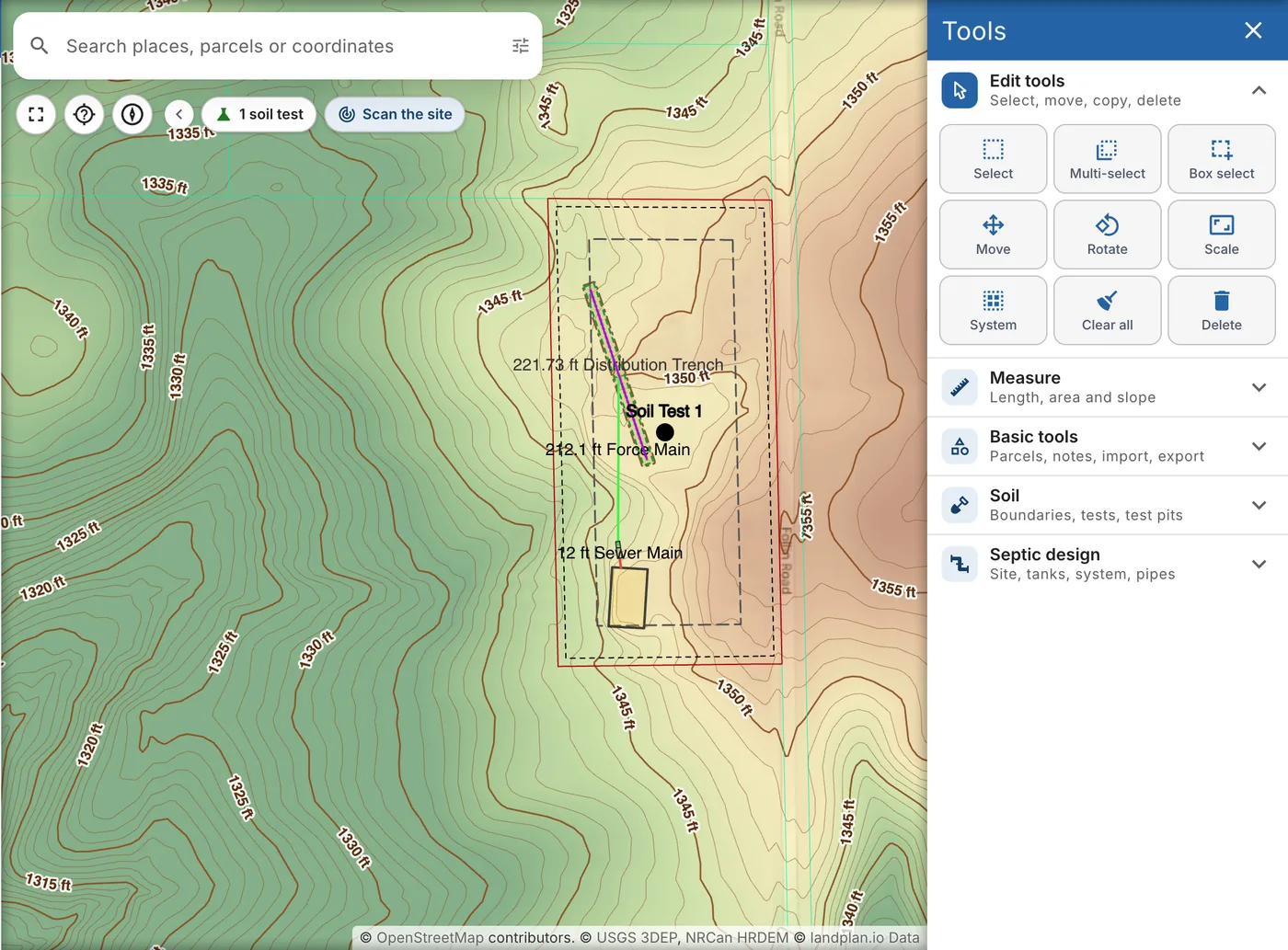
See Map Tools.
Calculations and the report
Click Details in the top bar to open the design calculator. It works in four steps:
- Flow and sizing. The design flow from the bedrooms, the soil loading rate, the tanks and the absorption area.
- Elevations. The grade, the inverts and the static lift from the house to the absorption area.
- Pressure and pump. The force main, the zones, the friction losses, the total dynamic head and the pump.
- Report. The report pages, the cost estimate and the PDF.
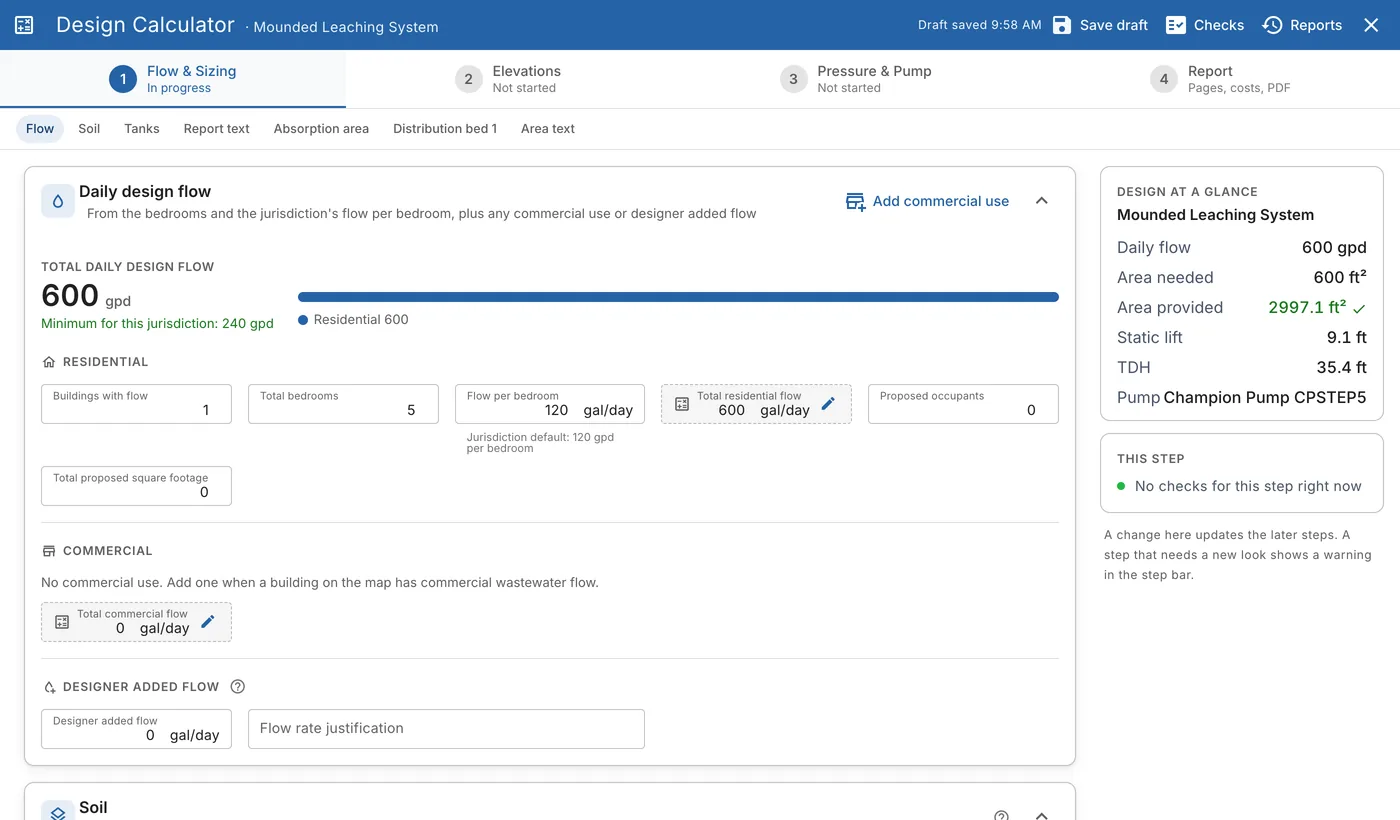
Each number shows where it came from, and Checks lists anything that doesn't meet the rules.
The report PDF has these sheets, depending on the system:
- Title, with the materials estimate, the construction notes and the plan contents.
- Hydraulic Profile (HP-1), the flow path from the house to the absorption area, seen from the side.
- Cross Section (CS-1), the absorption area to scale, with each layer named.
- Top View (TV-1), the absorption area seen from above.
- Map Print, the site plan.
- Dosing Detail, the dose tank, the floats and the pump curve. Only pumped systems have it.
- Calculations, the flow, soil, area and pump numbers.
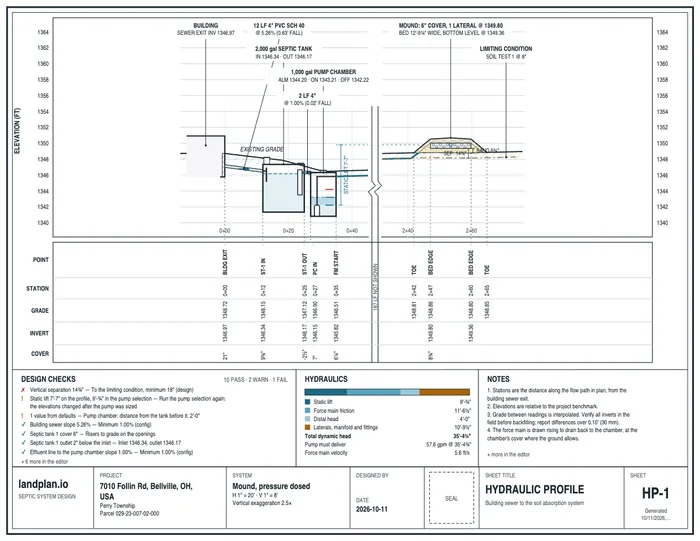
See Details and the Report PDF.
Products, prices and estimates
Designs use real products, not placeholders. The catalog has over 1,700 products, with their dimensions, spec sheets and prices, from manufacturers and distributors in the US and Canada. When landplan.io picks a tank or a pump, it picks one a distributor near the project has, ranked by fit.
The cost estimate prices the design from the map:
- Products, with the length of each pipe and the volume of the bed media and soil cover.
- Your price book. Change a price once and keep it as your default for new designs.
- Labor, fees and terms, from the rates you set up.
Click Download estimate PDF for the estimate, a PDF of its own. Auto design can make it with the report. See Cost Estimate.
Print, share and review
- Print. Click Print in the top bar to turn the map into a one-page site plan, with a title block, legend, north arrow and scale bar. Add text, arrows, callouts, dimensions and note boxes, then download the PDF or use the page as the report's Map Print sheet. See Print a Site Plan.
- Share. Send a map link to a customer, an installer or a reviewer. They open the map in their browser. Tick Can mark up to let them draw on it, and read what they leave under Viewer comments. See Sharing Your Map Digitally.
Teams and organizations
An organization keeps a team's projects and settings in one place. From the organization pages you can:
- Invite Members and give each one a role. Roles sets what each role can do.
- Set the Price book and the design defaults, such as the tank material, the preferred distributor and the report letterhead.
- Receive plans for review under Reviews, if your organization is a health department or other agency.
- Create API keys, when landplan.io has set up API access for the organization.
- Manage the team's seats and payment under Billing.
In the field
- On a phone. landplan.io works on a phone or a tablet. Design and Print open as sheets from the bottom of the screen.
- As an app. Add landplan.io to your home screen and it opens full screen, like an installed app. On an iPhone or iPad, tap Share, then Add to Home Screen.
- Your location. With location on, the bar at the bottom of the map shows your latitude, longitude and altitude. Click Start Recording track to record where you walk, and My location in Basic tools for options based on where you are.
- The field log. Log test holes from the surface down in the Field Log (beta), at the test pit.
- GPS points. Import points from a GPS unit, or export points to one with Export data (GPX, CSV).
Get started
- Sign up. The first week is free.
- Follow Getting Started to create your first project.
- Click Design and try Auto design on an address you know.