
Low Pressure Pipe
A low pressure pipe system (code LPP) is a set of shallow trenches with small pressurized pipes in them. A pump doses the effluent through the pipes, and small holes drilled along them spread it evenly over the whole length of every trench.
The parts an LPP system shares with other systems are described in Common Components.
How it works
The trenches of an LPP system form a pipe network:
- The force main carries the effluent from the dose tank.
- The manifold splits the force main to the laterals.
- The laterals are the pipes in the trenches. The installer drills small holes (orifices) along them.
When the pump runs, the network is pressurized and the effluent squirts evenly from every orifice. Pressure distribution has been used for decades to put effluent into clay soils: it loads the whole absorption area evenly, instead of flooding the start of each trench.
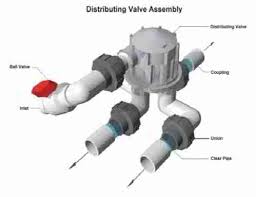
LPP systems are hard to design by hand. There are many orifices and often a large flow. The design must keep the area each orifice serves within the rules, keep the flow difference along a lateral small (often under 10 %), and keep a scouring velocity in the pipes (often 2 ft/s). A large flow can need a large pump, so the field is often split into zones dosed in turn by a distributing valve.
Design an LPP system in landplan.io
- Add the soil test, the house, the sewer main, the septic tank and the dose tank. See Septic Design.
- In Tools > Septic design > System, click Trench and draw the first trench along the contour. See Trench Tool.
- Click Contour and choose Low Pressure Pipe System. Set it up in the Design form and click Draw System.
- Click Distribution and add a Distribution Valve or a Headworks, with a manifold to each trench. See Distribution Method.
- Draw the Force Main from the dose tank to the valve. See Pipe Tools.
- Open Details to size the pressure network and the pump. See Pressure and Pump.
For each step of the contour tool, see Contour Systems.
The LPP form
The fields come from your area's configuration, and so do their defaults. These are the main ones:
| Field | What it sets | Typical default |
|---|---|---|
| Number of Trenches | How many trenches are laid. | 4 |
| Design Length on Contour | The length of the trenches, from your trench line. | Your line's length |
| Trench Width and Trench Height | The size of each trench and the depth of its media. | 1.5 ft, 8 in |
| Depth Into Existing Soil and Depth Soil Cover | How deep the trench sits and the soil over it. | 14 in, 6 in |
| Trench Spacing | The distance between trenches, Center to Center or Sidewall to Sidewall. | 4 ft sidewall to sidewall |
| Distribution Media | The media around the laterals. | Gravel |
| Lateral Configuration | End Feed (1 Lateral), Center Feed (2 Lateral), Double Center Feed (4 Laterals) or Quadruple Center Feed (8 Laterals). | Center Feed (2 Lateral) |
| Lateral Pipe Diameter | The size of the laterals. | 1 1/2 in |
| Orifice Diameter and Orifice Spacing | The holes drilled in the laterals. | From your area's rules |
The bar along the bottom gives Required Distribution Area, Lateral Length, Total Computed Area and Estimated Flow (gpm).
The laterals of an LPP system must be of equal length for even dosing, so its trenches don't use Follow contour: they are drawn parallel to your line.
Your area's rules decide some values for you:
- Lateral diameter by lateral length in Indiana and Ohio (1 in for short laterals, up to 2 in in Ohio).
- Lateral configuration: centre fed in Indiana and Pennsylvania.
- Orifice diameter and spacing: 3/16 in orifices unless your area sets another size (1/4 in in Indiana). Ohio allows one orifice per 6 sq ft.
- Linear loading. Ontario sizes LPP systems by their length along the contour.
What Smart design and Auto design do
Both can generate an LPP system from your configuration's LPP form. An LPP system is always pressure dosed, so they add a dose tank, a distribution valve with a manifold to each trench, and the force main. In Auto design, choose Low-pressure pipe (LPP) under System, or leave Best for the site.
See Smart Design and Auto Design.
Checks
The editor checks the trenches as it does for a leaching trench system: the vertical separation to the limiting condition, the soil cover, the spacing, the observation ports and the drawn length. Your configuration's rules add the area, the trench depth (2 to 30 in into the soil), the slope (a warning at 15 %) and, where your area sets them, the minimum soil cover and trench size. See Checks.
In Details, Pressure & Pump checks each lateral: its flow, velocity, friction loss and the flow difference from the first to the last orifice. See Laterals.
In the report
- Cross Section (CS-1): the section across the trenches, with the laterals and their orifices.
- Top View (TV-1): the trenches and laterals from above.
- Hydraulic Profile (HP-1): the house, the tanks, the force main and the trenches, with the total dynamic head.
- Dosing Detail: the dose, the floats and the pump curve.
- Calculations: the flow, the soil, the area and the pressure network.
See The report sheets.